Functional limitations and features of the Fomsoft Data Recovery program.
The main purpose of the program Fomsoft Data Recovery is to perform maintenance and recovery work on
retrieving files lost by the user from problematic media, internal and external hard drives, and flash drives
and memory cards. The program is available in two versions:
| № | Version | Functional restrictions
|
|---|
| 1 | Freeware
| Fully restores the directory tree, but restores files from one to
sixty-four Kbytes.< /strong>
To restore all other files, you must order the service from the Fomsoft Lab
manufacturing of a specialized commercial program Fomsoft Data Restore.
| 2 | License
| The full functionality of the program is limited to a predetermined number of licensed media.
The program is bound to a specific media by the Licensee
as necessary, since the list of licensed media is stored on the server of the Fomsoft Lab,
therefore, the program can only work if you have Internet access.
|
|---|
|
|---|
When launching the Licensed version, the program requests the user's Login and Password (the Licensee), (Fig. 4.):
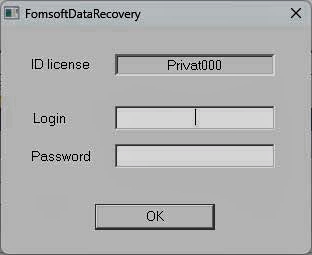
Fig. 4. The authorization request of the user (Licensee).
If authorization is successful on the Fomsoft Lab server, the program receives a list of serial numbers of licensed media
and displays the start screen shown in figure 5.
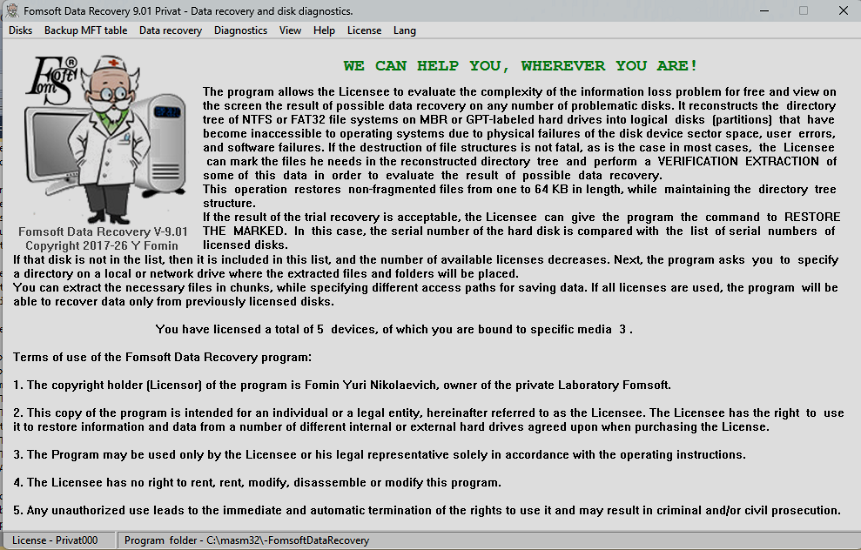
Fig. 5. The main window of the licensed version of the Fomsoft Data Recovery program.
The program displays the License ID in the lower-left corner, and the total number of orders is displayed in the middle of the screen
licensed devices and the number of media already linked to the program.
If you run the free version of the Fomsoft Data Recovery program, you will not be logged in to the Fomsoft Lab server,
therefore, this version does not require Internet access. And the display screen shows the main window, shown in Fig. 6.
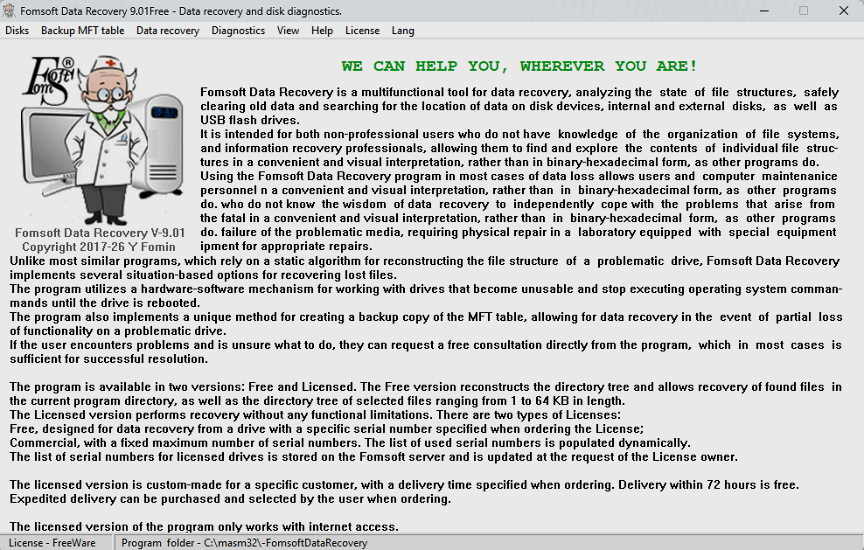
Fig. 6. the Main window of the free version of the Fomsoft Data Recovery program.
|